Recycling Old Tech: A Segmented Home Network and a Private Media Server

My ISP upgraded my gateway to a newer model and let me keep the old one. Instead of tossing it in the e-waste pile, I turned it (plus a decommissioned enterprise appliance from eBay) into a segmented home network with a private Jellyfin media server. It came together over a weekend, and I'm writing it up in case the approach is useful to someone else.
It started with a spare gateway
The old gateway sat in a drawer for months while a vague plan formed in the back of my head: I'd been wanting to segment my home network for a while.
The reason is straightforward. Modern homes are full of cheap IoT devices, and each one is a small computer with questionable update discipline. I didn't want all of them sitting on the same flat network as my laptops and my NAS. If one of those gadgets gets popped, I'd rather it be trapped in a corner with nothing worth reaching.
That's the whole idea behind segmentation: put devices into trust zones and only allow the connections that actually need to exist.
The zones I landed on
After sketching it out, I settled on a handful of trust zones (mostly due to the constraints of the hardware I had available). Two of them ride on the new gateway's own WiFi, and the trusted home network runs off the repurposed old gateway:
| Network | Hosted on | Purpose |
|---|---|---|
home_guest | New gateway (Guest SSID) | Internet-only for visitors, isolated from everything |
home_iot | New gateway (Main SSID, repurposed) | Cloud-controlled IoT devices |
home_lan | Old gateway (dumb AP) | Trusted devices: laptops, phones, TVs, media server, NAS |
The nice trick here is that the new gateway's built-in guest-network feature already isolates its two SSIDs from each other for free. So I repurposed one slot for actual guests and the other for IoT devices, which only ever need to phone home to the cloud anyway. No local network access, no problem.
That left the trusted home network. The retired gateway was perfect for it: unplug its WAN port, turn off its DHCP, and bridge a single LAN port into a real firewall, and it becomes a plain access point with none of its own routing to get in the way.
Is this the ideal segmented home network design? Of course not. It is what serves my immediate needs, given the constraints of time and budget I had to work with. If you're reading this and looking to buy networking gear to set up your own network, a better design would be to isolate the media devices to their own network as well, and keep the sensitive devices seperate... that way a compromised Roku can't see the NAS you use for storing your banking statements (or whatever). Or if you're working with even less hardware, maybe you'd just do a 2-network design, one for untrusted devices and one for the trusted ones.
This is descriptive, not prescriptive.
The old gateway's job is just to put trusted devices on the network. Something still had to route and firewall between the zones, and that's where the next piece of recycled hardware comes in.
The Riverbed rabbit hole
I stumbled onto a YouTube video about repurposing old Riverbed SteelHead WAN-optimization appliances as home firewalls. These things were expensive enterprise gear in their day, and now they show up on eBay for pocket change because nobody wants a discontinued WAN accelerator. Underneath, though, they're just x86 boxes with a handful of gigabit NICs, which is exactly what you want for a firewall.
I picked up a CX770 and installed OPNsense on it.
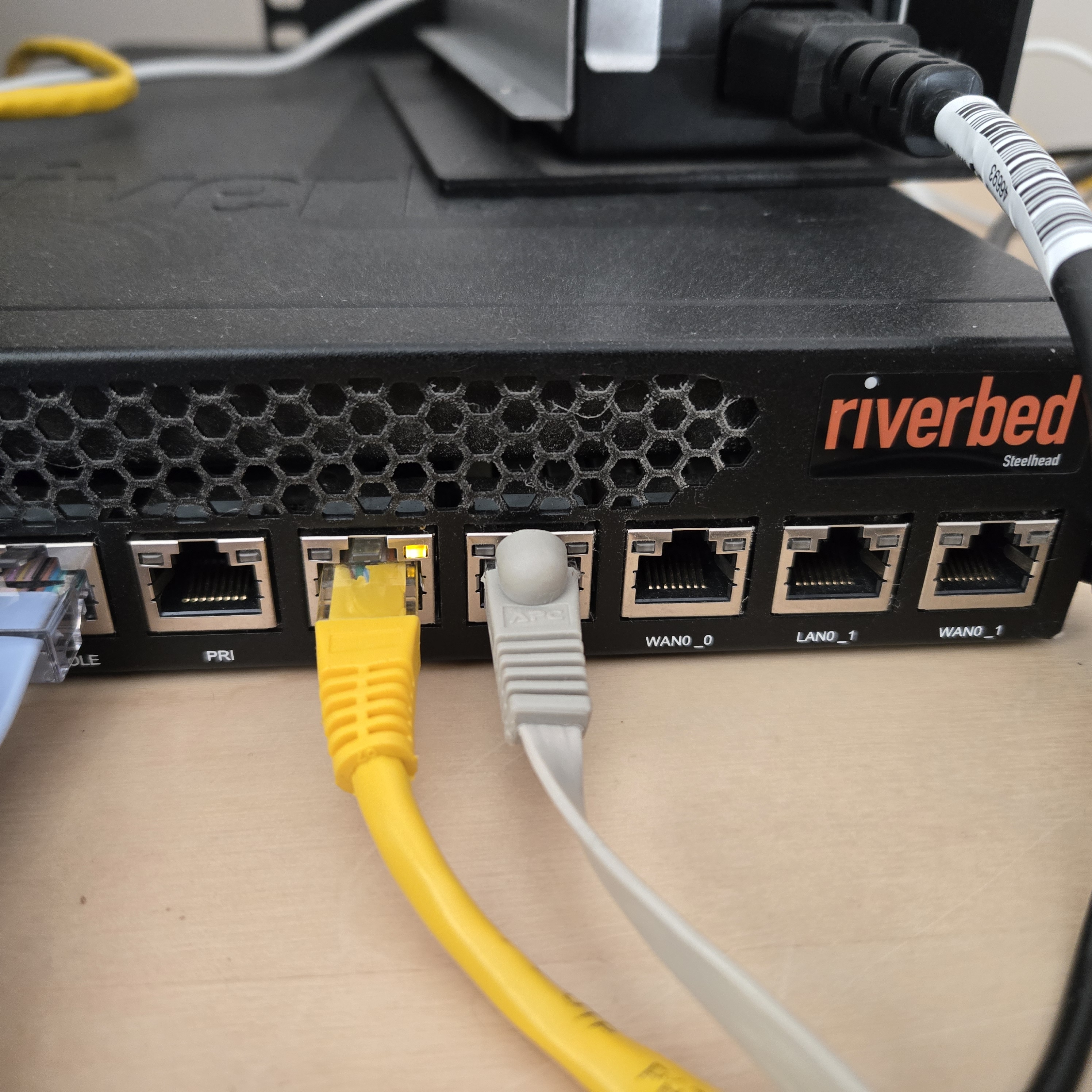 The appliance needed a little prep first (disabling its hardware bypass relays in the BIOS, and doing everything over a serial console), which I've collected in the troubleshooting section below.
To get a clean handoff, I put the ISP gateway into passthrough (bridge) mode so it hands its public IP straight to the OPNsense WAN interface and does no real firewalling of its own. OPNsense becomes the single brain making all the routing and firewall decisions.
The only thing I actually bought was the used CX770. The old ISP gateway became the access point for my trusted network, running as a "dumb AP": WAN port unplugged, its own DHCP disabled, a single LAN port bridged into OPNsense. All the routing and DHCP lives on OPNsense.
Why Jellyfin: a private media library for the kids
Around the same time I was building all this, I realized I had a growing pile of home videos of my kids and no good way to watch them from the couch. They were scattered across phones and cloud backups, and playing them on the TV meant casting or fiddling with apps.
I also started using Suno to generate personalized kids' songs and music for them. Custom lullabies, goofy songs with their names in them, that kind of thing. Those files were just sitting in a downloads folder.
The plan: put it all on my Synology NAS and serve it with Jellyfin on a media server that lives entirely on my own private network. No accounts, no ads, no algorithm. The kids get a simple interface on the TV with their videos and music, and I control what's there.
Building the Jellyfin server
The media server is an Ubuntu box running Jellyfin as a native systemd service (not Docker), sitting on the trusted home_lan. The library lives on the Synology NAS, mounted over SMB/CIFS.
For playback, the box uses an NVIDIA GTX 1070 (Pascal) for hardware transcoding via NVENC, which is plenty for 1080p home streaming. The Jellyfin service account needs access to the GPU device nodes:
sudo usermod -aG video,render jellyfin
sudo systemctl restart jellyfin   # group change only applies after restart
groups jellyfin                   # confirm: video render
Home videos and music don't come with the metadata Jellyfin expects, so they mostly just show up as a flat library organized by folder. That's fine for our use case.
A note on other content you might serve (I'm not a lawyer)
My library is home videos and AI-generated music, so there's nothing legally complicated about it. If you're planning to put ripped DVDs or other commercial media on your Jellyfin server, the legal picture is murkier, and Jellyfin also expects a specific naming convention to scrape metadata for that kind of content. The rest of this section is for you.
If you do go that route, Jellyfin scrapes metadata from the folder and file names, so it's worth following its naming conventions. Movies go in Title (Year)/Title (Year).mkv, and the (Year) is what keeps the live-action The Lion King (2019) from colliding with the animated The Lion King (1994). TV shows go in Show (Year)/Season NN/Show (Year) SNNENN.ext. Get the folder structure right and the scraper handles the rest.
None of this is legal advice. Making your own digital copies of media you paid for sits in a genuinely murky part of US copyright law, and it's worth understanding the shape of it before you start.
The sympathetic side rests on fair use. In Sony Corp. of America v. Universal City Studios (the 1984 "Betamax" case), the Supreme Court held that recording broadcast TV at home to watch later ("time-shifting") is fair use. Later, in RIAA v. Diamond Multimedia, the Ninth Circuit spoke approvingly of "space-shifting" music you already own onto another device. Those are why many people assume format-shifting their own discs is clearly fine.
The complication is the DMCA's anti-circumvention rule, 17 U.S.C. § 1201. It makes it illegal to bypass a "technological measure" that controls access to a copyrighted work, and the CSS encryption on DVDs (and AACS on Blu-rays) is exactly that. Fair use is not a defense to a § 1201 claim. Breaking the lock is its own violation, separate from whether the copy you end up with would otherwise be fair use (the University of Michigan Library has a clear summary). So even for a disc you own, decrypting it to make a personal backup is legally contested.
The Copyright Office grants temporary § 1201 exemptions every three years. The current (2024) exemptions for video are specific and narrow: short clips used for criticism, comment, or teaching; captioning and audio description for accessibility; preservation or replacement of damaged discs by eligible libraries, archives, and museums; and text-and-data-mining research at nonprofit universities (the full regulatory text is 37 CFR § 201.40). An individual making a personal copy of a movie for home viewing isn't on that list.
The space-shifting route
There's a path that avoids the § 1201 circumvention problem entirely, at least in theory. A licensed DVD or Blu-ray player is authorized to decrypt a disc for playback. If you play the disc on a licensed player and record its already-decrypted output, the lock was opened by an authorized device and you're not the one breaking any encryption. The "analog hole" (recording the decoded video output) and screen-capture of a decoded stream both work this way. The Copyright Office itself treats screen-capture as a method distinct from decryption, which supports the idea that capturing already-decrypted output isn't "circumvention" under the statute.
That still leaves the ordinary copyright question of whether the resulting copy is fair use, which rests on the space-shifting idea from Diamond: format-shifting media you already own, for your own use, onto a device of your choosing. It's a reasonable reading, though it has never been cleanly settled for permanent, full-length video copies.
The short version: if you own the discs and produce your own copy through a method that doesn't involve unauthorized circumvention, serving it from a media server at home is the least legally fraught approach. How you produce that copy is your call and your responsibility.
The trade-offs I accepted
Segmentation comes with compromises. I made a few deliberate ones to keep this a weekend project:
- The media server and NAS live on the same flat
home_lansegment as the TVs and Rokus. I merged them in to avoid saturating a slow backhaul link with concurrent 4K streams. The cost is that OPNsense no longer firewalls between them, so containment now comes from host-level firewalls (ufwon the Ubuntu box, DSM's firewall on the NAS) and key-based SSH instead. - IoT sits behind the ISP gateway's own NAT, isolated but unmonitored by OPNsense. Acceptable for the lowest-stakes devices in the house.
What it added up to
For the price of one used enterprise appliance, I turned a drawer of retired hardware into:
- A properly segmented network that keeps IoT gadgets away from anything I care about
- A private, ad-free, algorithm-free media library for home videos and music I fully control
If you've got an old gateway or router sitting in a drawer, it's probably more capable than you think.
Troubleshooting & gotchas
The specific dead ends I hit, collected here so they're searchable if you run into the same thing. Skip this unless something above bit you too.
SteelHead bypass relays
SteelHeads have physical relays on some port pairs that short the ports together on power loss, so traffic keeps flowing through the appliance if it dies inline. That made sense for a WAN accelerator. In a firewall it defeats the purpose, so I disabled fail-to-bypass in the BIOS. The PRI/AUX ports I ended up using aren't bypass-capable anyway, so WAN was never at risk.
Serial console COM port changes between reboots
The CX770 has no useful video output, so setup happens over a USB-to-serial cable and PuTTY at 9600 baud (or if you update this to increase it). The COM port number can change between reboots. If you get a blank terminal, check Device Manager for the current port number before assuming something worse is wrong (assuming you're on a Windows machine).
nvidia-smi: Driver/library version mismatch
On first boot, nvidia-smi failed with a Driver/library version mismatch because an unattended update had bumped the driver package without a reboot, so the running kernel module no longer matched. A reboot loaded the new kernel and matching module together and cleared it. Yes, "hello, IT, have you tried turning it off and turning it on again?" was the solution.
Roku playback stalls (Direct Stream buffering)
A high-bitrate video file kept stalling on an entry-level Roku, and I initially assumed it was a bitrate or GPU problem. It wasn't. The file was a modest 1080p H.264 stream, so Jellyfin was Direct Streaming it: copying the video untouched and only remuxing the container. The Roku couldn't keep a stable buffer on that copied stream and went into a stop/restart loop. The same file played fine in the web player on a laptop, which pointed at the client rather than the network.
The fix is to force the server to re-encode into a steady, capped stream the Roku can buffer. Per-device, in the Roku's Jellyfin app:
- Bitrate limit: 5 Mbps (below the file's ~8 Mbps, so the server must down-encode)
- Force transcoding: on
After that, nvidia-smi shows an ffmpeg process during playback and the video runs start to finish.
Writing to the CIFS-mounted library
The NAS is mounted with forceuid/forcegid so every file appears owned by jellyfin:jellyfin. My normal login user couldn't write to the library until I added it to the jellyfin group. On top of that, rsync -a fails on that CIFS mount unless you add --no-perms --no-owner --no-group --no-times --omit-dir-times to cancel out the parts of -a the mount won't allow.